StaticForm vs StaticForms.dev
Two services with confusingly similar names. We created an account on StaticForms.dev and went through the entire setup. Here is what the experience actually looks like, and where the two services diverge.
What it's actually like to set up StaticForms.dev
We signed up, created an account, and went through the entire setup flow. Here is what happened, step by step.
You sign up and land on a dashboard with no obvious next step
After signing up, the dashboard shows two counters: "Emails this month" and "Total accounts." There is a button to add a new account. No forms, no endpoints, no code snippet, no indication of what to do next.
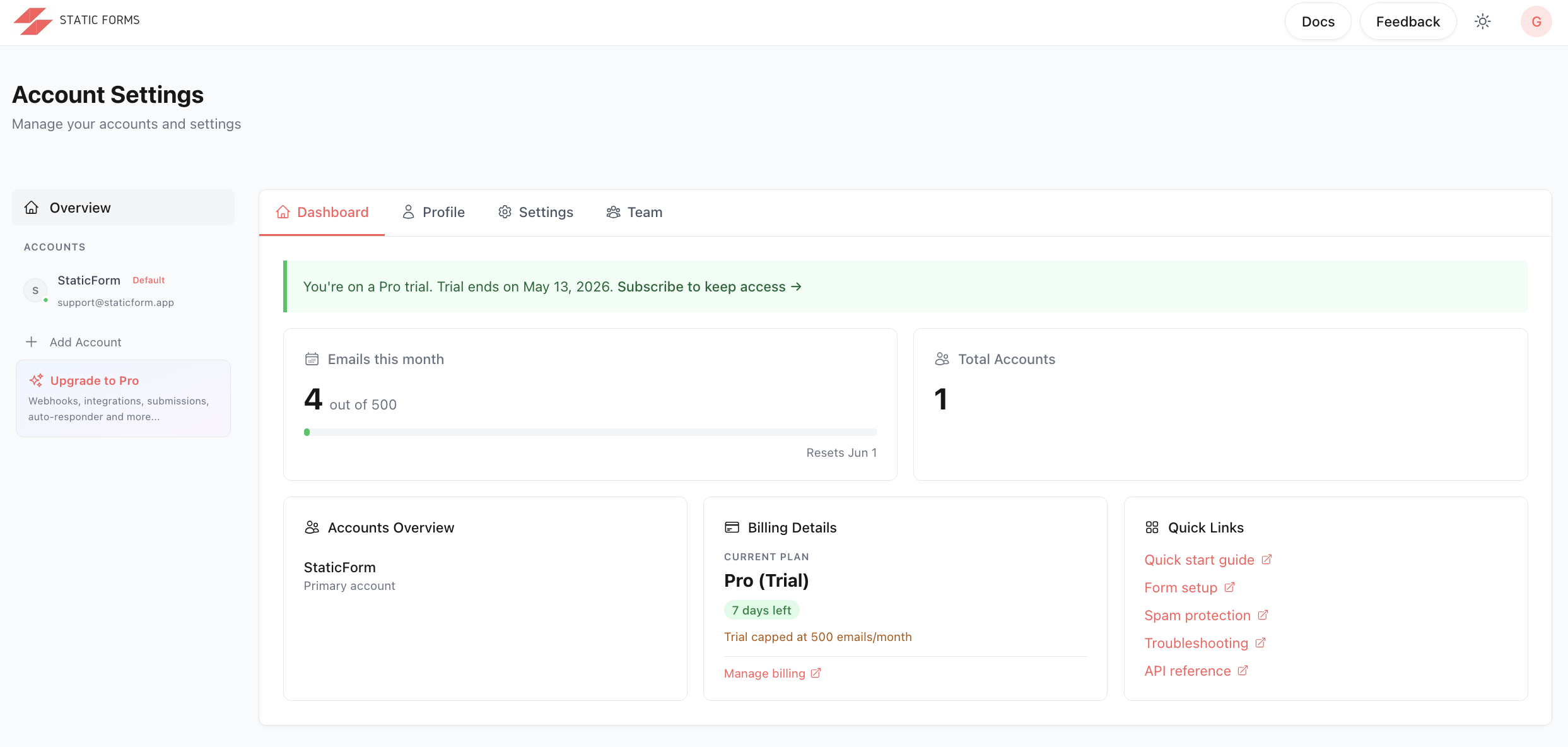
This is the moment the confusion sets in. The goal was simple: add a form to an HTML page. But nothing on this screen explains how. There is no generated snippet, no "here's your endpoint," no next step. Just two counters and a button to add an account. To find out how to actually wire a form into a site, you have to leave the dashboard, find the documentation separately, and navigate to the quickstart guide yourself.
The concept of a "form" doesn't exist here. What StaticForms.dev calls an account is effectively a form slot. You need to create one before anything else makes sense.
Creating an "account" requires a unique email address
You click "Add account" and a modal appears asking for a name and an email address. The note reads: "Email address, verification status, and API key are always created fresh for the new account."
One email address per form
Each account (read: form) needs its own unique email address. If you try to reuse an email, you get an error: "An account with this email already exists." Running a contact form, a newsletter signup, and a job application form on the same site means you need three separate email addresses.
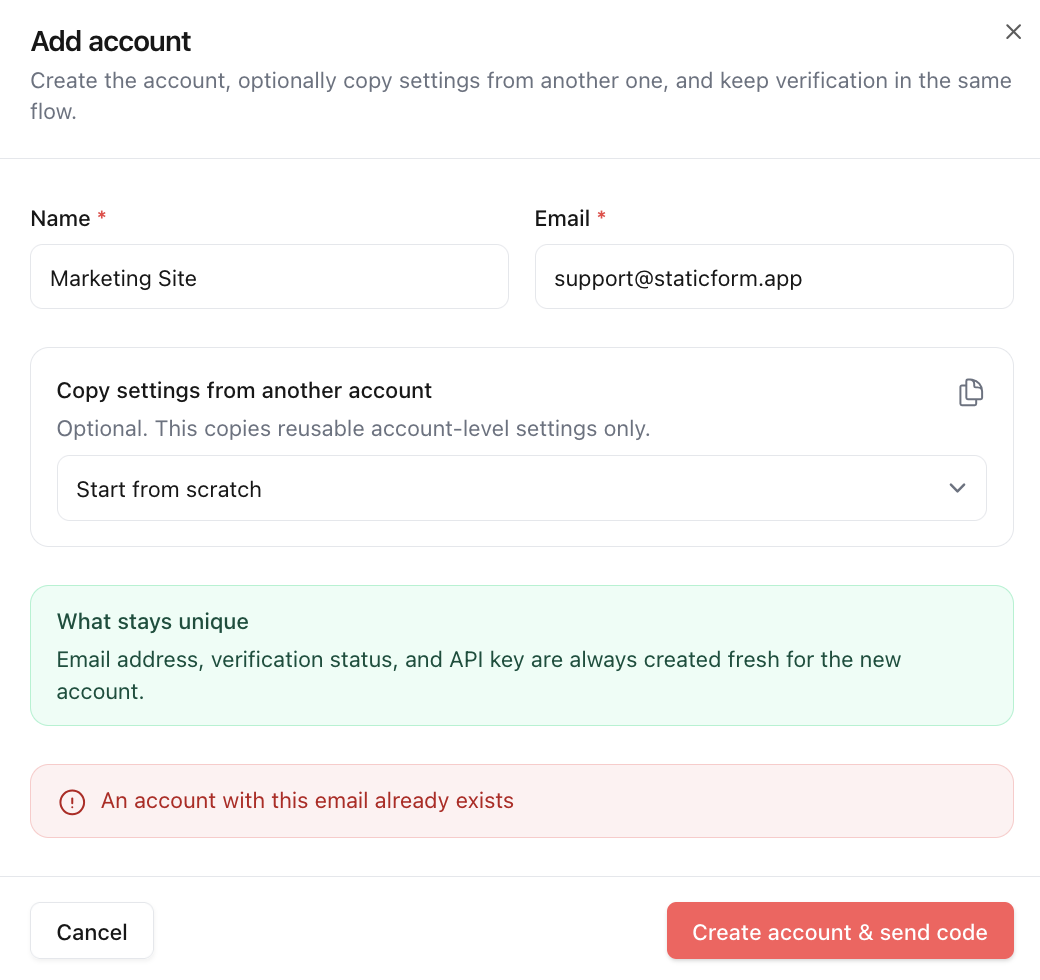
This is a major inconvenience for agencies or anyone with more than one form per project. You're either managing an inbox of catch-all aliases or creating separate email accounts for each client form.
You open the account to find your API key, then go look up the docs yourself
Once the account is created, you click into it. The account view has tabs for Overview, Submissions, Settings, and Integrations. The Overview tab shows your API key. That key is what goes into your form code.
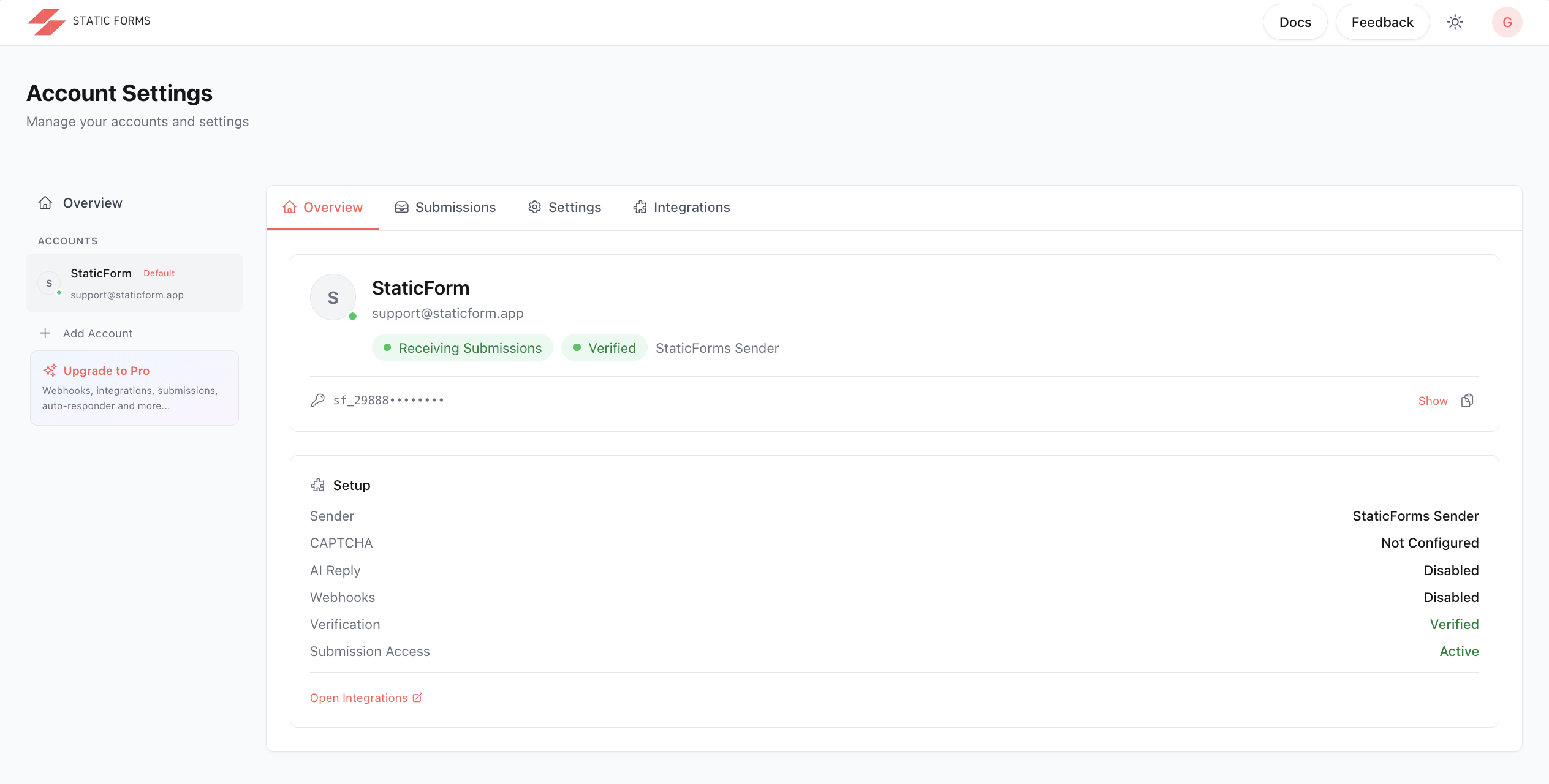
This is the moment the confusion sets in. The goal was simple: add a form to an HTML page. But nothing on this screen explains how. There is no generated snippet, no "here's your endpoint," no next step. To find out how to wire the form into a site, you have to leave the dashboard, find the documentation separately, and navigate to the quickstart guide yourself.
The sidebar also shows an Upgrade to Pro prompt listing webhooks, integrations, and the auto-responder as paid features. On the free plan, your API key works for email notifications and 30-day submission storage. Anything beyond that requires Pro.
The integration is fully manual
Once you find the quickstart guide in the documentation, you build the form entirely by hand: the fetch call, config object, validation logic, loading state, error handling. The documentation shows you how, but it's all custom code you write and maintain.
The honeypot field name must include the word “honeypot”
StaticForms.dev’s spam protection includes a honeypot field, but the field name must contain the word honeypot. Any bot that checks field names before deciding whether to fill them will skip it trivially. It is security through obscurity, without the obscurity.
There is also no server-side validation. StaticForms.dev forwards whatever comes in. If you want to reject submissions with a missing field or an invalid email format, that logic lives entirely in your front-end code.
What you get once it's running
Email notifications
Once you're through the setup, it works. An email arrives when a form is submitted, and the free tier gives you 500 emails per month at no cost. StaticForms.dev also has one genuinely useful feature StaticForm doesn't: AI-generated auto-replies that go back to the person who submitted your form.
Although it's worth thinking through what that means in practice. The reply is generated by an AI based on the submission content, which means you have no control over exactly what it says. If someone submits a message your model interprets in an unexpected way, the reply can come out confused, off-tone, or just wrong. A support request with ambiguous wording might get a confident but incorrect answer. A complaint might get a response that sounds dismissive. A message in a language the model handles poorly might get a garbled reply. That email goes out to a real person under your name, and there is no review step before it sends.
Spam filtering
The spam filter does run, but some of what it catches is worth knowing about. During testing, IPs started getting blocked at a rate of about one to two submissions per minute. That is not spam. That is normal traffic: a few people filling in a contact form over the course of an hour. If multiple people in the same house, office, coworking space, or school submit your form within a short window, later submissions get marked as spam with no warning and no way to whitelist a legitimate IP. Think of a teacher posting a registration form for students: every student on the school network shares the same outgoing IP, so only the first few submissions go through.
The filter also checks message length against undisclosed thresholds you cannot configure. A perfectly valid short message gets silently rejected, and so does a detailed one that exceeds their hidden ceiling. There is no way to adjust what counts as acceptable, and there is no error shown to the person submitting.
Domain restriction
StaticForms.dev also offers a domain restriction setting, which sounds like a security feature. In practice it only checks the Origin header, a value any bot can set to anything in a single line of code. It stops other websites from submitting to your endpoint, which is not a realistic attack vector. It does nothing to stop an automated script pointed directly at your form. The false sense of security is the main risk: it looks like protection while leaving the actual surface open. StaticForm has no domain restriction feature and does not need one. Its spam checks are based on submission content and behaviour, not on which domain the request claims to come from.
Notifications and routing
That email is one per submission. You can add a CC address, but there is no way to route to different recipients based on a field value or stack further actions on top. The email body uses an HTML template with limited access to submitted data. You can't insert a timestamp in a specific timezone, pull in a specific field value, or list all submitted fields in a formatted block.
Integrations
The Integrations tab lists Webhooks, Google Sheets, and Slack, but all three require a Pro upgrade. The webhook sends a fixed payload in StaticForms.dev's own format with no way to change the body, headers, or structure. Discord requires its own JSON shape with a content or embeds key. Pointing the webhook at a Discord channel returns an error.
The Slack integration works the same way: a fixed message format, no variable insertion, no preview of what it will look like before you save.
One account. Unlimited forms. Each one separate.
StaticForm starts from a different premise: forms should be the primary object, not a side effect of creating accounts. Sign up once with your email. Then create as many forms as your project needs (contact form, newsletter signup, job applications, feedback survey), all under the same login, all completely separate.
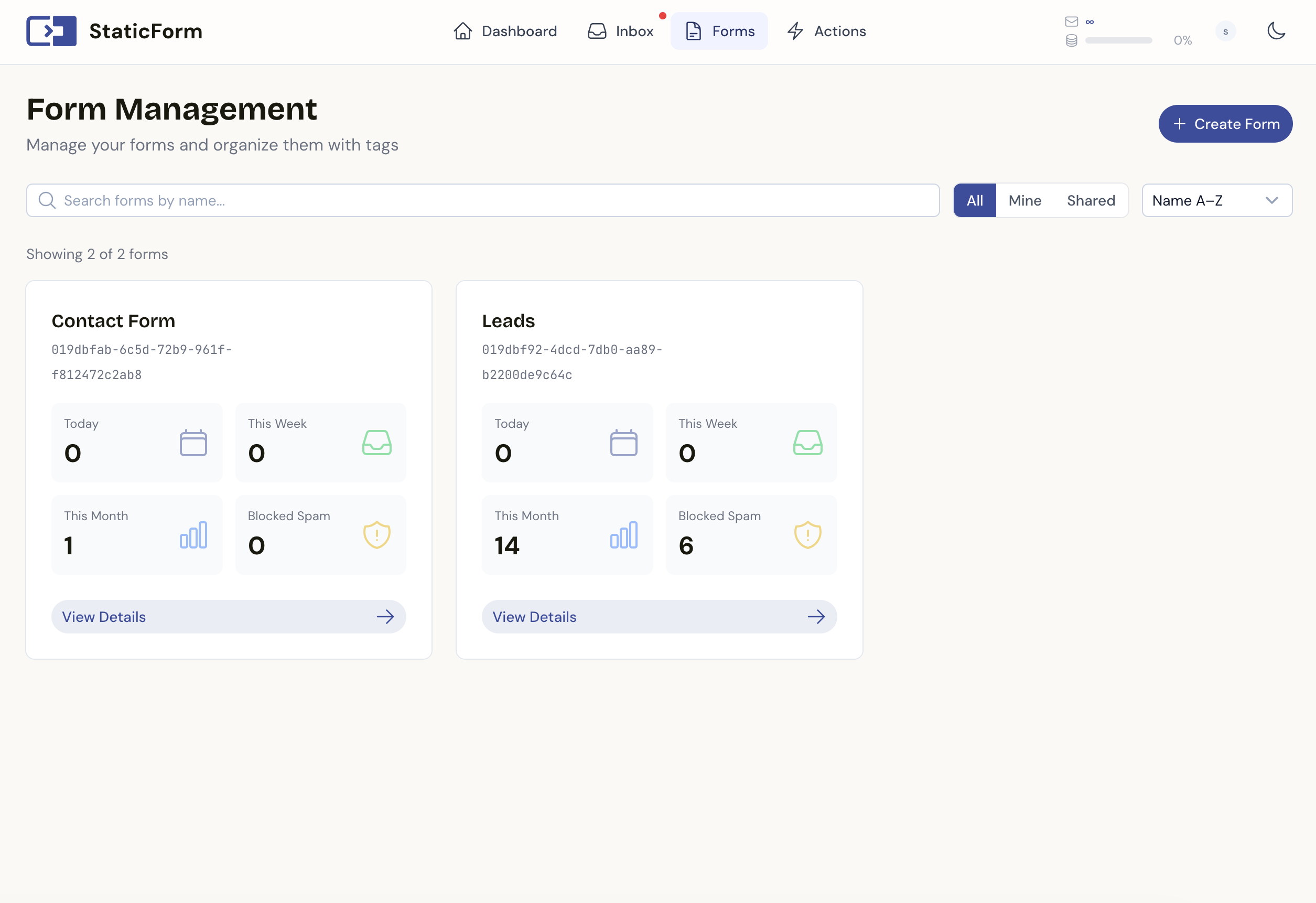
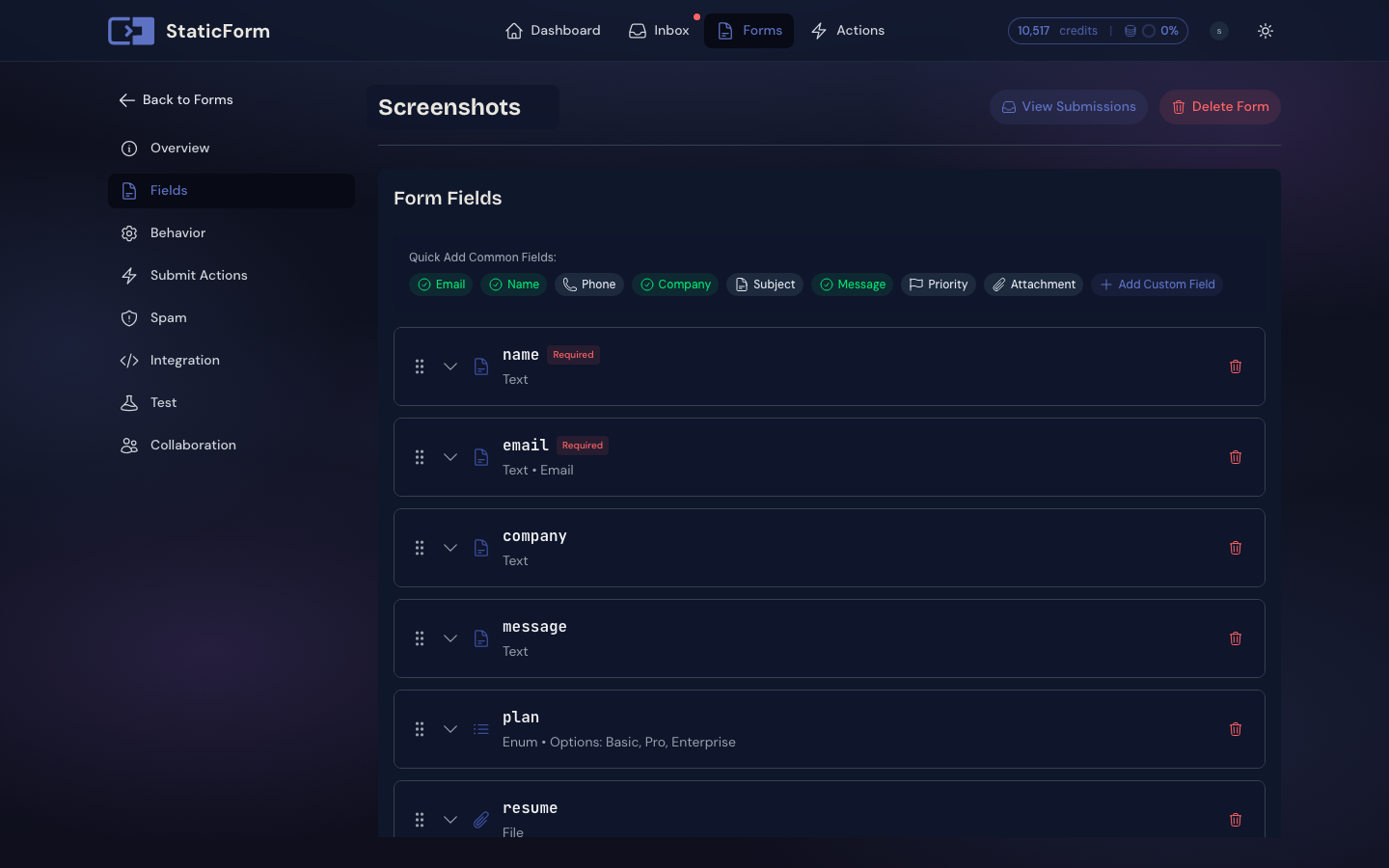
Field validation is configured on the server. You define which fields are required, what type they should be, and any length or pattern constraints. StaticForm rejects invalid submissions before they ever reach your inbox or fire any notifications. No front-end validation dependency required.
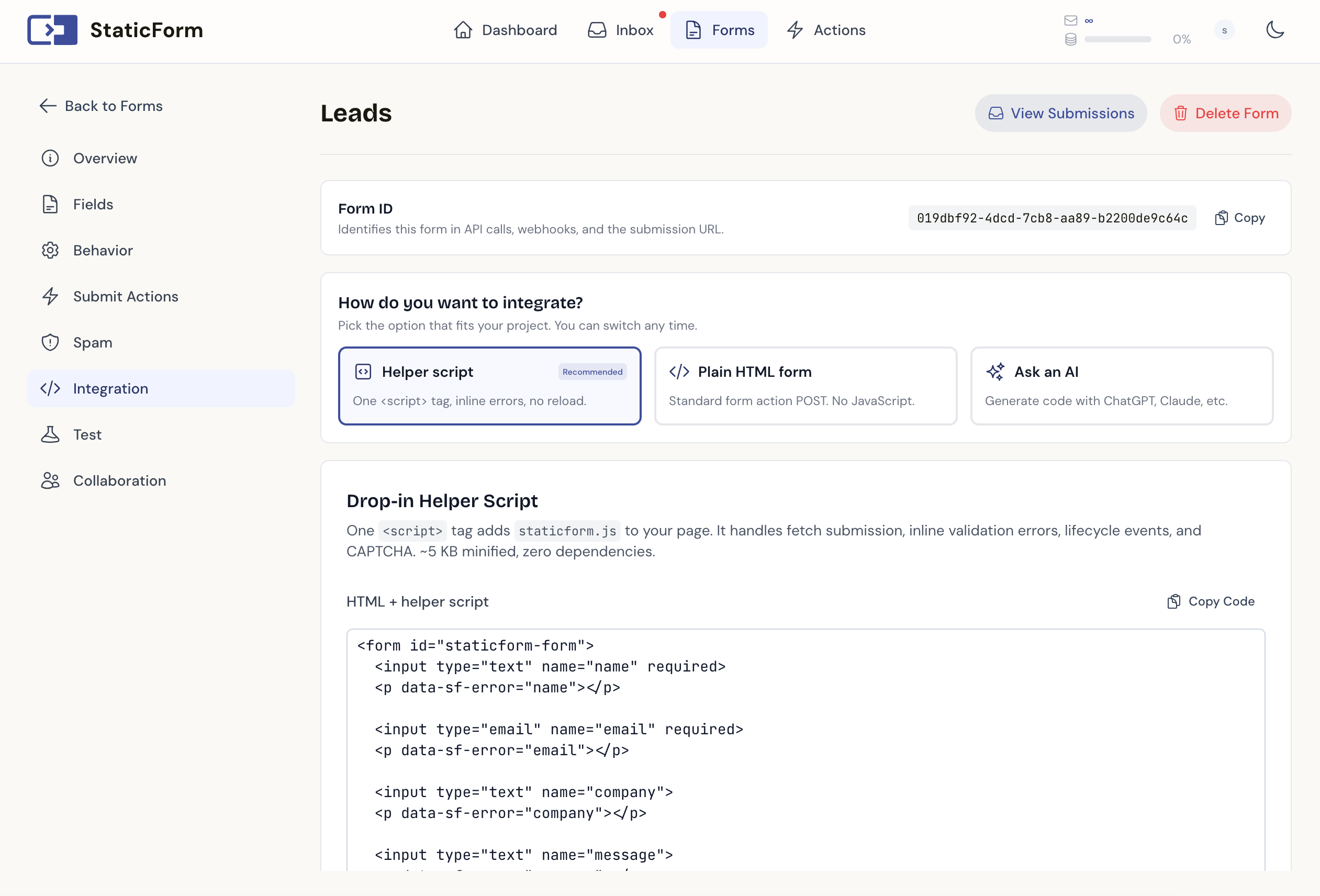
When you create a form, you are automatically taken to the integration tab. It generates a ready-to-paste HTML snippet, a JavaScript helper script example, and an AI prompt you can hand directly to Claude or ChatGPT. The helper script handles AJAX submission, inline field error rendering from server responses, loading state, and CAPTCHA token injection automatically. It handles the same pile of submit glue code you'd otherwise write from scratch on every project.
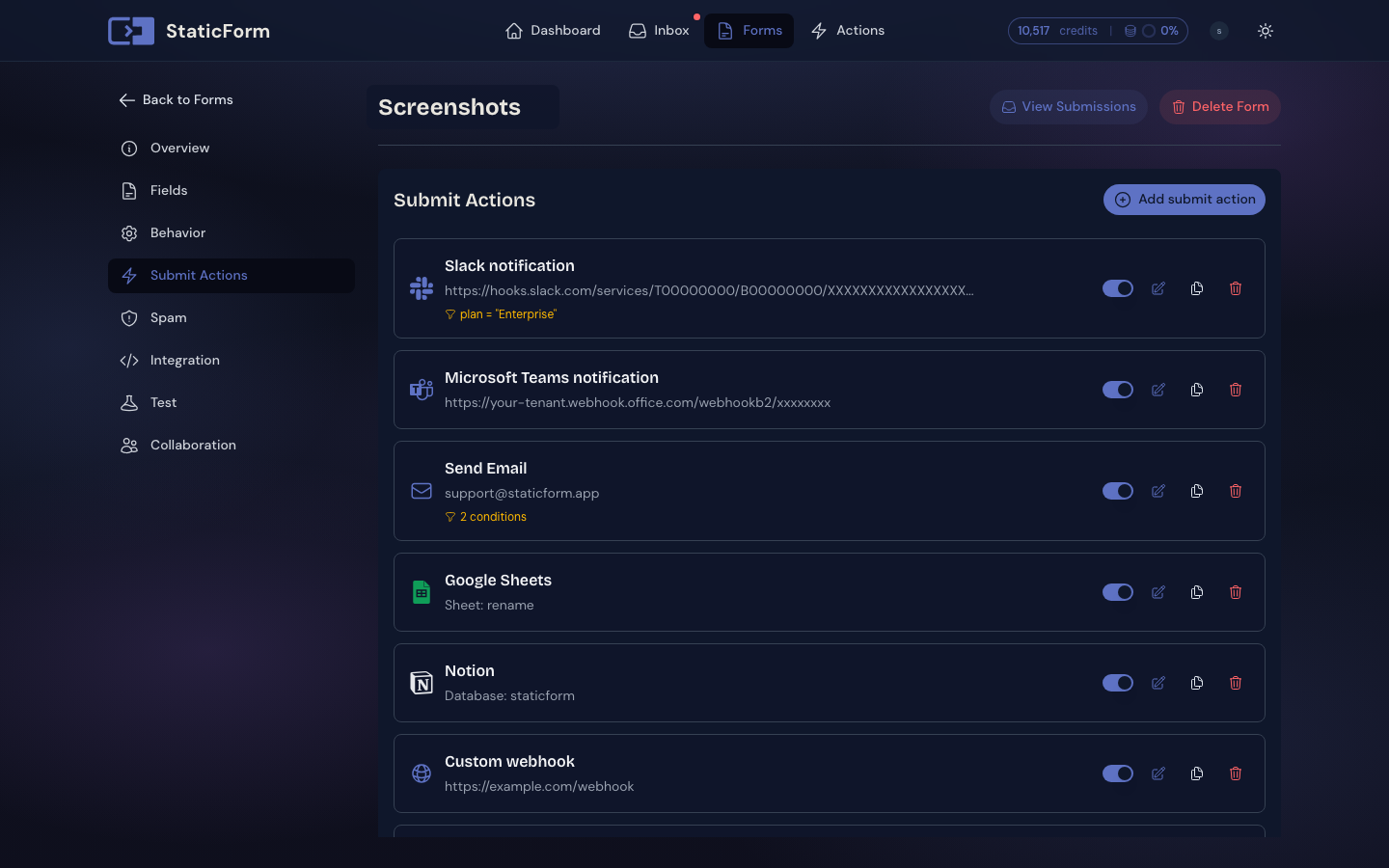
Each form gets its own endpoint URL, its own submissions inbox, and its own set of submit actions. There's no one-notification limit. You can stack as many actions as you need on a single submission: an email to the client, a second email to the internal team, a Slack message to the sales channel, a row appended to a Google Sheet. Each action is configured independently.
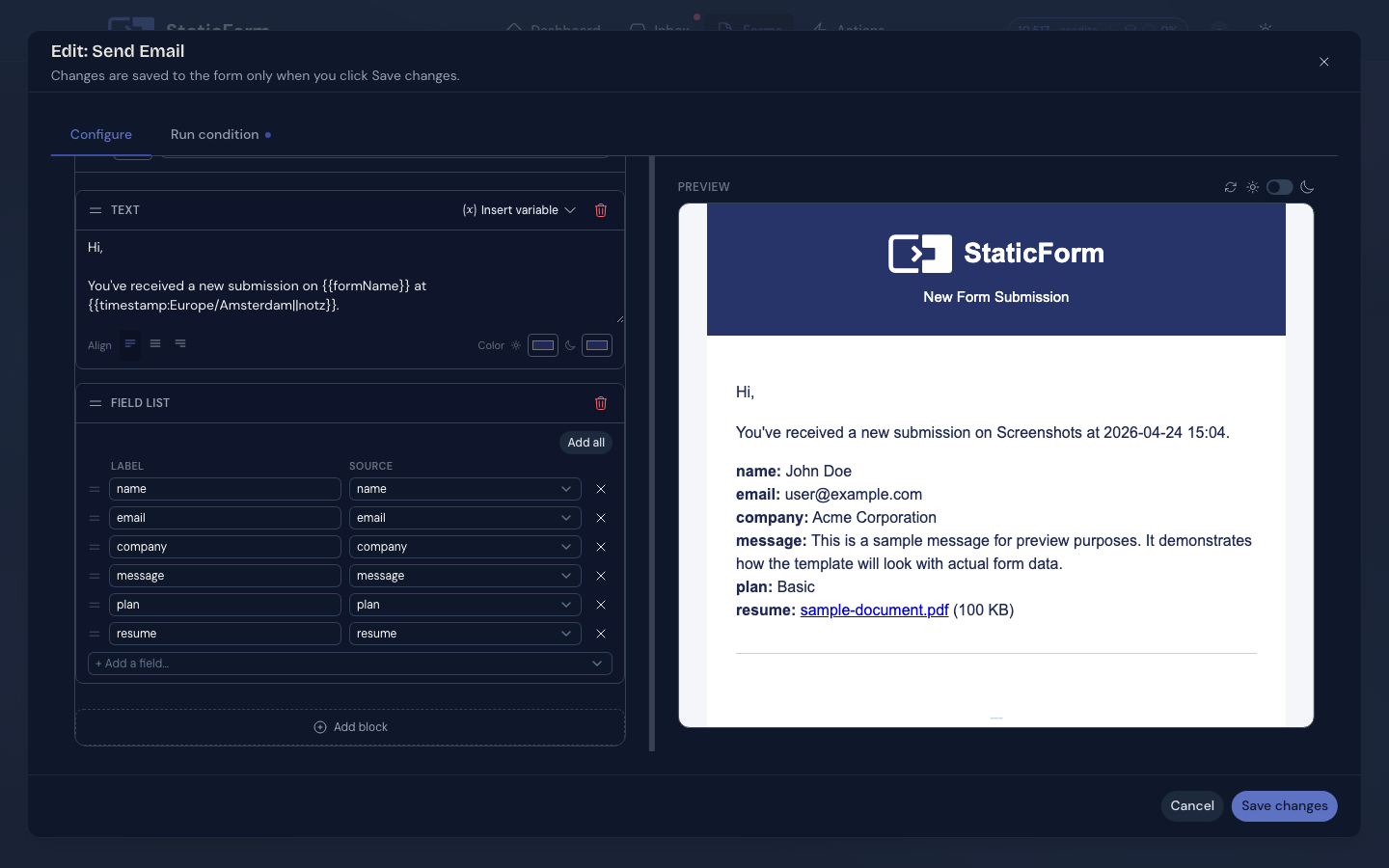
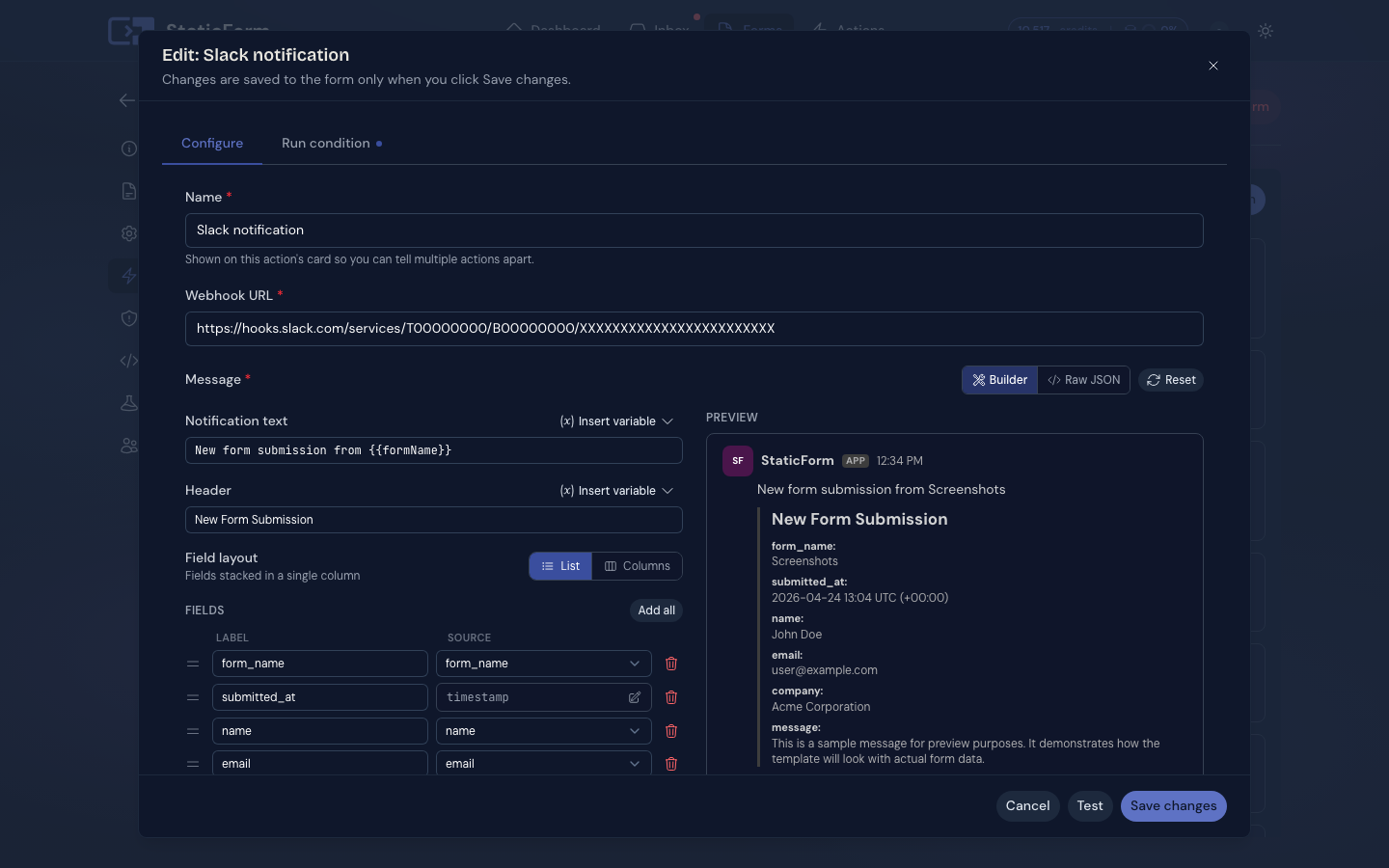
The email body builder shows a live preview of exactly what the email will look like before you save. You can insert any submitted field, a formatted submission timestamp in the timezone of your choice, or a block that lists all fields automatically. The same variable system works in the Slack and Discord message builders, with a visual composer that previews the formatted message as you build it, so you know the payload is correct before it goes anywhere near a webhook endpoint.
For webhooks, you define the full request: endpoint, headers, and body. Variables from the submission slot into the body template, so Discord's embeds format, Slack's block kit, or any custom API schema works exactly as you configure it. Webhooks are included on every paid plan. No Pro upgrade required.
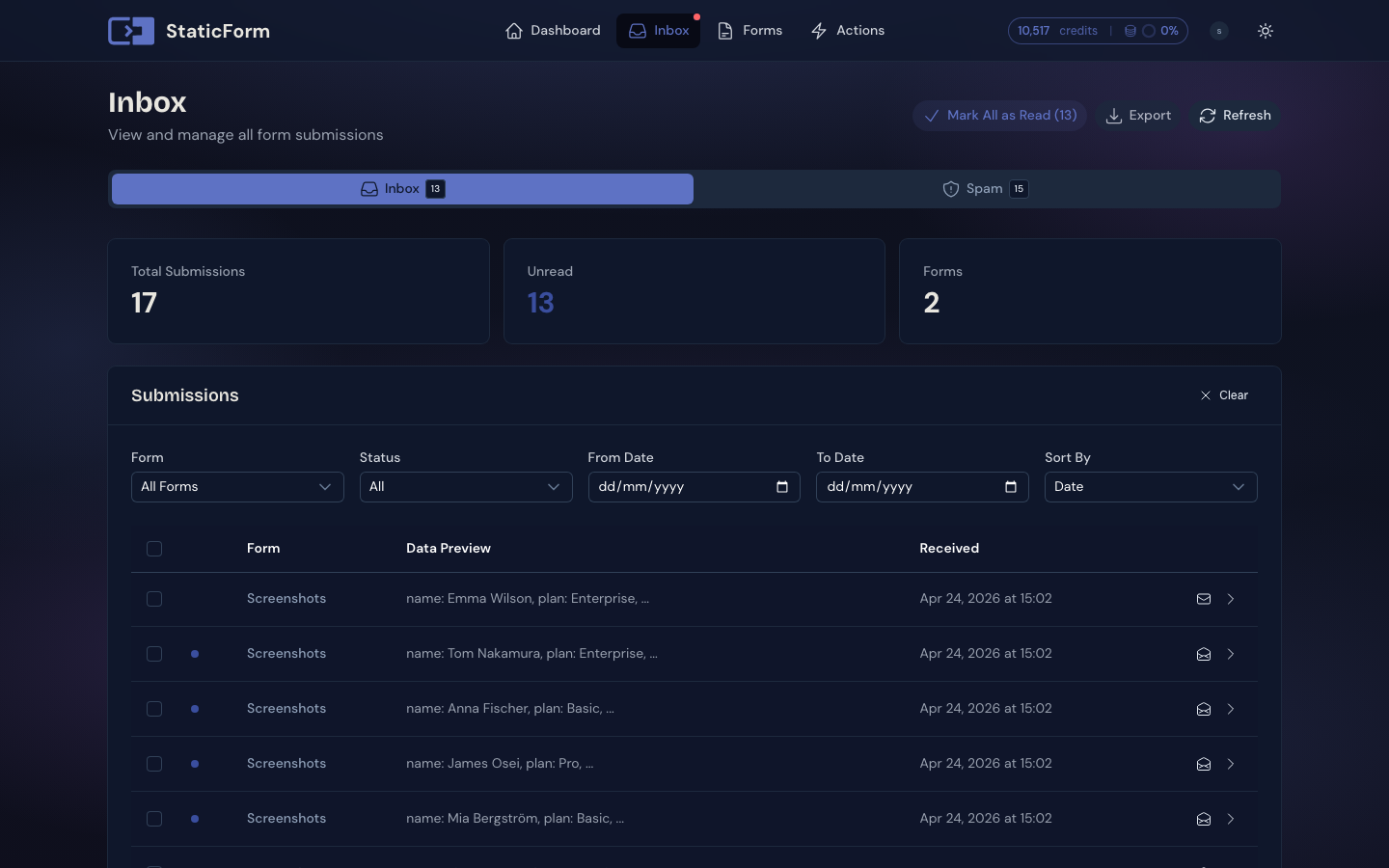
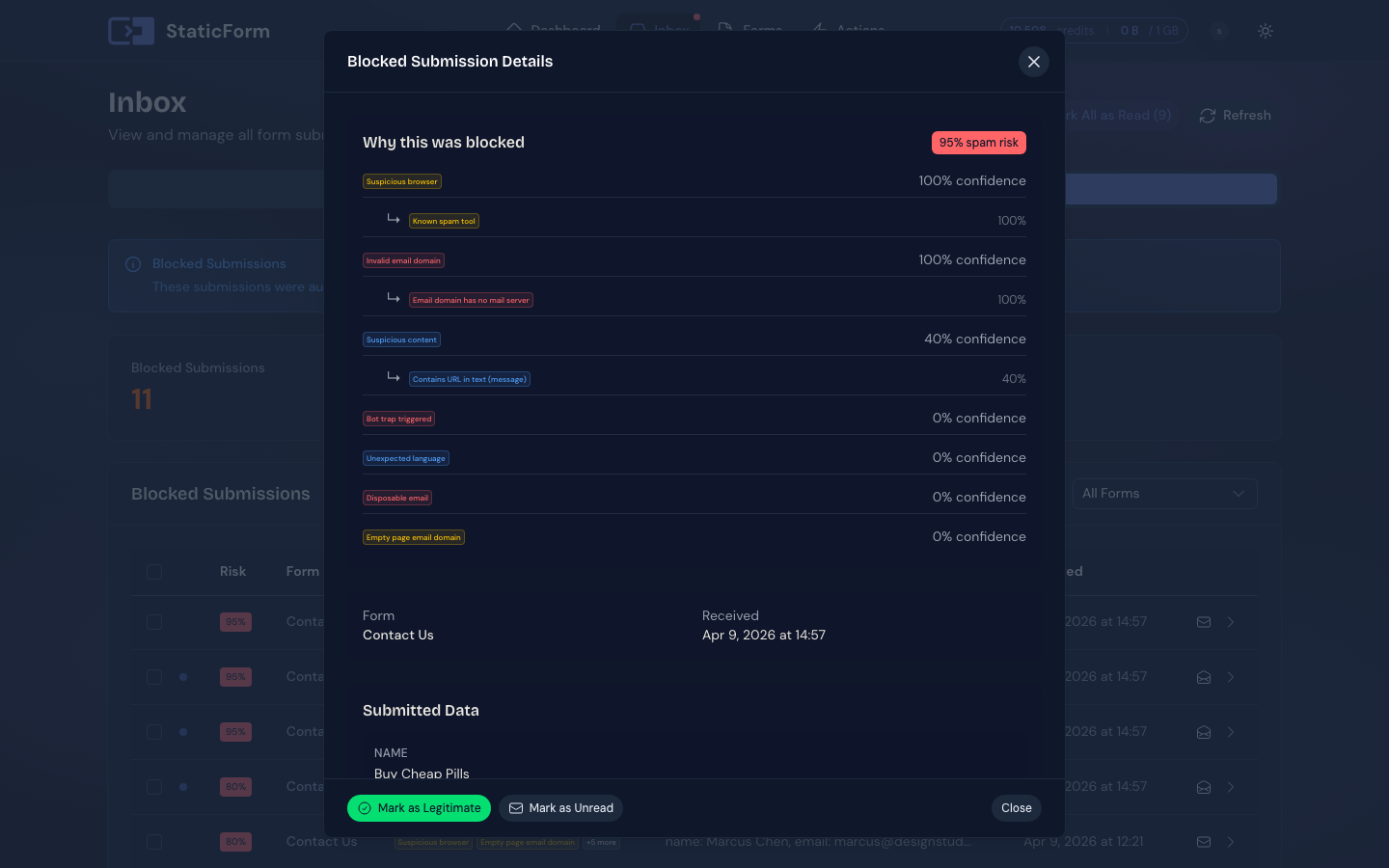
The submissions inbox lets you filter by date, mark items read or unread, bulk delete, and export in CSV or JSON. When the spam filter catches something, the inbox shows exactly which filters fired and why. You can see the reason before deciding what to do with it. If you recover a submission from spam, you choose whether to trigger your submit actions or just restore the data quietly. For more advanced use cases, StaticForm also provides a documented REST API so you can query submission data directly for custom reporting or external data analysis.
There is no data retention limit. Your submissions stay until you remove them: individually, in bulk, or all at once. You can export everything at any time in a GDPR-compliant format, or delete your entire dataset in a single action if you need to. StaticForms.dev automatically purges data after five years, which means long-running forms will silently lose history unless you've already exported it. And if you simply want to remove a form entirely, StaticForm has a delete button. StaticForms.dev has no visible option to delete an account.
Spam is caught before it reaches your inbox or fires any actions. StaticForm publishes exactly which checks it runs, so there are no hidden thresholds or mystery rejections. You know upfront what the filter looks at and why a submission might be flagged. The checks include bot patterns, disposable email addresses, language scoring, honeypots, and more. None of them rely on the Origin header or where the request claims to come from. StaticForm does not restrict by domain at all. Spam protection is based on submission content and behaviour, so it works whether a submission arrives from a browser, a script, or a headless tool. IP signals are one input, but StaticForm only acts on IPs with genuinely suspicious patterns, not on volume alone. A family submitting a job application from the same home network, or a team filling in a feedback form from a shared office IP, won't get caught. Field length limits are ones you set yourself: minimum and maximum per field, defined in your form configuration, so the filter only rejects what you've decided is invalid.
Spam never counts against your quota on either service. What makes StaticForm different is that there isn't really a quota to count against at all. Submissions are never metered. The monthly fee covers the infrastructure; what lands on your forms doesn't change what you pay. A traffic spike, a bot sweep, a post going viral: none of it shows up on your bill.
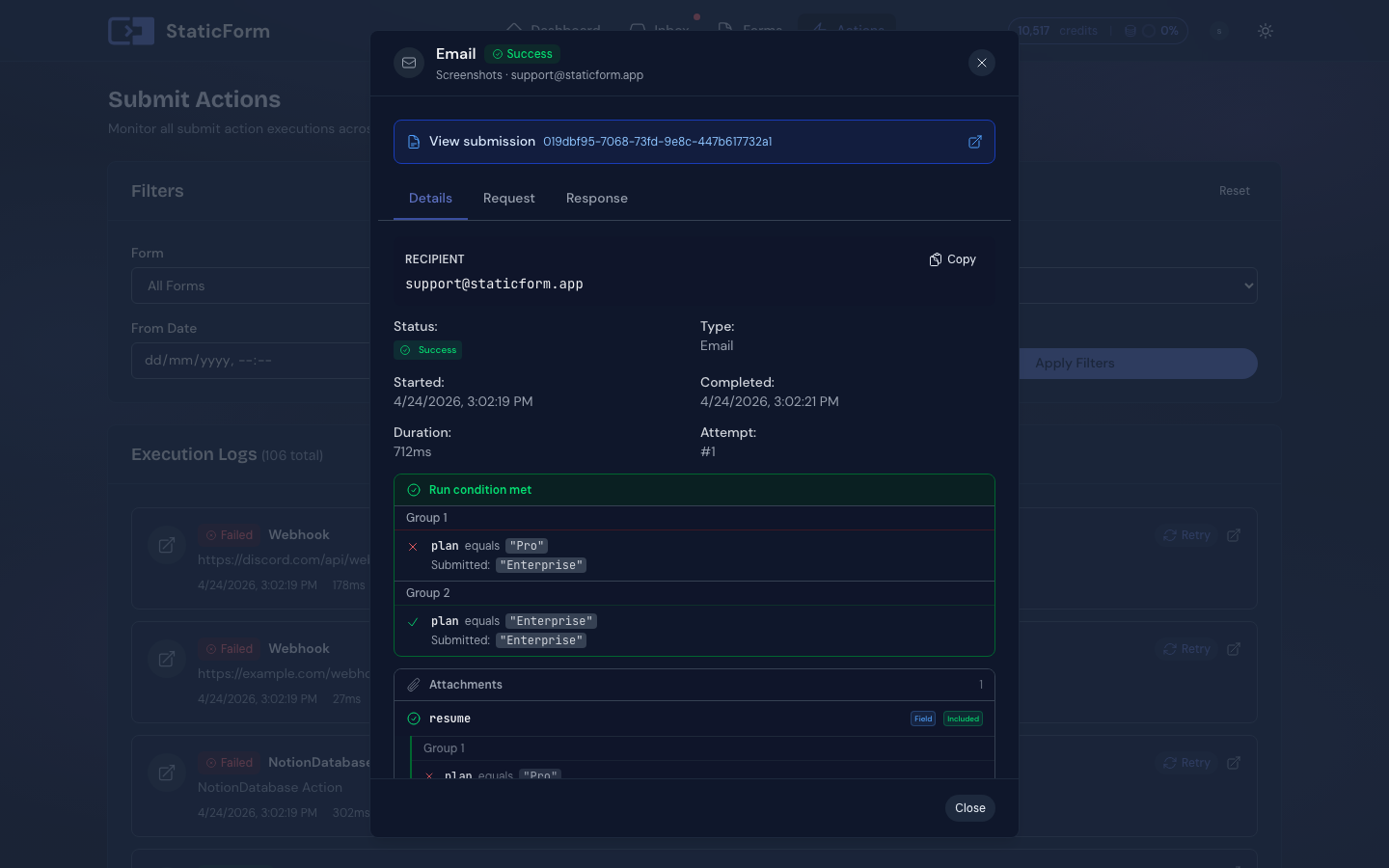
Every notification attempt is logged: what ran, what it targeted, the HTTP status code, and the full error message if something went wrong, plus a button to retry it directly from the dashboard. If a Slack webhook rotates or a Google Sheet gets deleted, you find out immediately with the exact error, not via a confused client three days later. That kind of visibility is what makes integrations trustworthy rather than fingers-crossed.
7-day free trial. No payment method required.
Where StaticForms.dev genuinely wins
A real free tier
500 emails per month, ongoing, no expiry. If you're running a low-traffic site and don't want to pay anything, that's a genuine advantage. StaticForm requires a paid plan for production use. You get a 7-day free trial to try everything first.
AI auto-replies
StaticForms.dev can send an AI-generated reply to the person who submitted your form. StaticForm does not have this feature. If an immediate, automated acknowledgement to submitters matters for your use case, that's worth knowing.
Altcha CAPTCHA support
StaticForms.dev supports Altcha, a privacy-focused open-source CAPTCHA alternative. StaticForm covers reCAPTCHA v2, reCAPTCHA v3, Cloudflare Turnstile, and hCaptcha, but not Altcha.
Feature by feature
StaticForm uses one account for all your forms. StaticForms.dev requires a separate email address for each form account.
StaticForms.dev issues one API key per account, tied to an email address.
StaticForm generates a ready-to-paste HTML snippet, a JS helper example, and an AI prompt on form creation. StaticForms.dev gives you an API key and points you to the docs.
StaticForm provides a helper script that handles AJAX submission, inline error rendering, loading states, and CAPTCHA. StaticForms.dev requires you to build all of this yourself.
StaticForm validates each field against rules you configure: required, type, length, pattern. Invalid submissions are rejected before they reach your inbox.
StaticForms.dev supports reCAPTCHA v2 on all plans; v3, Altcha, Turnstile, and hCaptcha are Pro-only. StaticForm supports reCAPTCHA v2, v3, Turnstile, and hCaptcha on every plan. StaticForms.dev also supports Altcha, which StaticForm does not.
StaticForm stores uploads with 2 GB on Starter and 20 GB on Pro. StaticForms.dev supports file uploads but storage limits are not publicly documented.
StaticForms.dev supports one email per submission. StaticForm supports unlimited submit actions per form.
StaticForms.dev allows one email notification only. StaticForm lets you stack as many actions as you need: multiple emails, Slack, webhooks, Sheets, all from the same submission.
StaticForm has a live preview builder. StaticForms.dev uses an HTML template with limited variable support.
Both support variable insertion, but StaticForms.dev email templates have limited field access and no support for timestamps, timezone formatting, or metadata. StaticForm supports all submitted fields, submission time with custom format and timezone, and a block that lists all fields automatically.
StaticForm includes webhooks on all plans. StaticForms.dev requires a Pro plan.
StaticForm lets you define the endpoint, headers, and body template with variable injection. StaticForms.dev sends its own fixed format.
StaticForm includes Slack on all paid plans. StaticForms.dev has Slack on Pro only.
StaticForms.dev webhooks send a fixed payload format that Discord rejects. StaticForm has a live preview message builder with variable injection so you can craft the exact format each platform expects.
Both require a paid plan.
Pro plan.
Pro plan.
StaticForm shows which filters flagged a submission and why. StaticForms.dev marks it spam with no explanation.
Neither service counts spam against your email quota.
Both let you manually recover a submission from spam. StaticForm lets you choose whether to re-trigger submit actions on recovery. StaticForms.dev fires all actions immediately on unspam with no opt-out.
StaticForm detects the language of each submission, which can be used as a spam filter rule.
StaticForms.dev blocks an IP after a few submissions, so legitimate home or office IPs get caught if multiple people submit from the same address. StaticForm only blocks IPs with suspicious signals.
StaticForms.dev applies undisclosed length thresholds you cannot change. Valid submissions get rejected with no recourse. StaticForm lets you set exact min and max length per field.
StaticForms.dev offers domain restriction, but it only checks the Origin header. Any bot can spoof this in one line. StaticForm does not have domain restriction. Spam protection is based on submission content and behaviour, not where the request claims to come from.
StaticForms.dev enforces rate limits: 10 submissions/minute on Free, 20/minute on Pro with a 100/hour cap. Sustained traffic blocks the account for an hour. StaticForm has no per-minute rate limits.
Both store submissions and let you browse them. StaticForm gives each form its own inbox with read/unread tracking, filtering, bulk actions, and CSV/JSON export. StaticForms.dev shows all submissions in a single shared list across all your forms.
StaticForms.dev includes 30-day submission storage on the free plan. Pro and Agency plans extend this to up to 5 years. StaticForm imposes no retention limit on any plan.
StaticForms.dev has no date filter. Combined with CSV-only export this makes any time-bounded data extraction impractical.
StaticForm provides a documented REST API for querying submission data, useful for custom reporting or data analysis workflows.
StaticForm lets you delete a form in one click. StaticForms.dev has no visible option to delete an account (their equivalent of a form).
StaticForm lets you export all your data or delete it entirely at any time. StaticForms.dev does not surface this explicitly.
StaticForms.dev deletes submissions older than 5 years. StaticForm imposes no retention limit. Your data stays until you choose to remove it.
StaticForms.dev: 500 emails/month free with 30-day submission storage, but webhooks and integrations require Pro. StaticForm: 7-day free trial with all features, no payment method required.
How the plans compare
StaticForms.dev charges in USD; StaticForm charges in EUR. At approximately $1.10 per €1 (rate at time of writing), the Starter plans land at roughly the same price. Prices below show both currencies where relevant.
Free
$0 / month
- 500 email notifications/month
- No time limit, no card required
- 30-day submission storage
- No webhooks or integrations
Free trial
7 days, all features
- Every feature unlocked during trial
- No payment method required to start
- No permanent free plan
Pro
- 25,000 emails/month (overage billed extra)
- Submission storage
- Webhooks (fixed payload, no customization)
- Slack and Google Sheets
- AI auto-reply
- No spam filter configuration
- File storage (limit undisclosed)
Starter
- 25,000 email actions/month (overage billed extra)
- Submission storage
- Webhooks with fully customizable body
- No Google Sheets or Notion (Pro plan)
- Team collaboration
- 15+ configurable spam filters
- 2 GB file storage
- No AI auto-reply
Agency
- 30,000 email notifications/month
- Team members
- Everything in Pro
Pro
- Unlimited email actions, no cap
- Team collaboration
- Google Sheets and Notion integration
- Conditional routing
- Email attachments (static and submitted files)
- 20 GB file storage
- Priority support
StaticForm prices are in EUR, data stored in the EU. StaticForms.dev prices are in USD, data stored in the US.
Who should use which
StaticForms.dev makes sense if:
- You have one form on a low-traffic site and the free tier covers your volume
- You want AI-generated auto-replies sent to your submitters
- Simple emails and non-customizable webhooks are all you need for notifications
- You are comfortable creating a separate email address for each form
- You are okay with a less advanced spam filter and occasionally getting spam emails
StaticForm makes sense if:
- You run more than one form and need them kept completely separate under one login
- You want unlimited submissions with no per-submission metering, ever
- You need Slack, Discord, Teams, Google Sheets, or Notion without extra tooling
- EU data storage matters for your project or your clients
- You want to know immediately when a notification fails, with the exact error
- You want a spam filter with 15+ configurable rules and per-submission transparency
- Observability matters: execution logs, retry history, and failure details for every action
- You want fair pricing for unlimited emails (available on Pro)
- You want a pre-generated HTML snippet that just works, with no manual integration guesswork
7-day free trial. No payment method required.
get started
Your next real lead is
waiting to arrive.
Set up a form in 5 minutes. Spam blocked automatically. Every real submission stored, delivered, and logged.
Ready to get started?
Add forms to your site in minutes